

Punk UP Your Cybersecurity!
One way we’ve been adding to our research this year, and on into 2027, is by learning more about the cybersecurity steps that P2P lending providers take, and the steps that they should be taking, especially in these higher-risk times with AI exploiting major weaknesses with startling speed!
While we’re working on that, I wanted to share with you some things you can do to better protect your own P2P lending accounts.
I know that you can probably read ideas on this on 10,000 other websites, but these are at least a little bit tailored specifically to the most effective ones for your P2P lending cybersecurity.
1. Switch on 2FA or MFA to reduce unauthorised access risk by 98.56%!
Microsoft research finds that, even if your login and password details are leaked, multi-factor authentication (MFA), or two-factor authentication (2FA) reduces the risk of someone gaining unauthorised access to your online accounts by 98.56%.
As Neil wrote elsewhere on the site this month, 2FA is: “like having a lock that needs two keys – such as your password plus a quick code sent to your phone – to keep your account safe”.
Not all P2P lending providers offer this unfortunately, which is simply not good enough.
Some providers force everyone to use it, but other P2P lending companies make it optional. I urge you in those cases to take the time to set it up and start using it if you don’t already.
2. Never click links in emails/messaging apps even from known recipients unless you’re absolutely sure
You can’t know an email or a link is legitimate just by looking at the email address or the sender on your phone!
It might even appear to come from someone you know or a company you know with the exact same email address or profile.
Even a pre-teen I know has learned to ask “Did you send this?” when she receives a link. It quickly becomes a good habit!
3. Passwords of eight characters get cracked in two hours; use a passphrase of 16 characters
Passkeys, password managers and/or simply using a password: t There are different options now that can be overwhelming.
The truth is that each has security risks and each has their place. In a perfect world, you’d really take the time to learn about all of these and then probably use all three, depending on whatever it is you’re trying to keep secure.
But it’s complex to strategise and get it all in place.
So, on the simplest level, where you’re using passwords, it’s unbelievable how many websites and online accounts still allow passwords with just eight letters, digits and special characters.
It doesn’t matter what combination you use, such short passwords can be cracked very quickly with ordinary computers.
For your P2P lending accounts:
- Double your password length to 16 characters. Bitwarden says it would probably take a billion years to crack that, rather than a few hours when using eight mixed letters, digits and special characters.
- You can use a passphrase – meaning several words together without spaces – to make it easier to remember.
- Don’t store your passwords online!
- Don’t use ChatGPT or other AI tools to generate your passwords. These tools are unable to make them random enough, according to Malwarebytes.
- Particularly make sure your email password is unique and not predictable. Email is likely the key to resetting passwords to lots of your lending accounts and can therefore be the gateway for criminals getting into all of them.
4. Set up a scheduled virus scan
I mainly use Avast Free Antivirus.
For your virus protection:
- Schedule a scan to run at least once a week. In Avast, go to Protection > Virus Scans, select “Custom scans” (or it might be under “Other scans”) and click Create a Custom Scan. Set the fields to do a full scan at least once a week.
- Whenever something odd happens, manually run a full scan, or even a full start-up scan (“boot-time scan”), which is the deepest. You scan manually by going to Protection > Virus Scans, and select your scan.
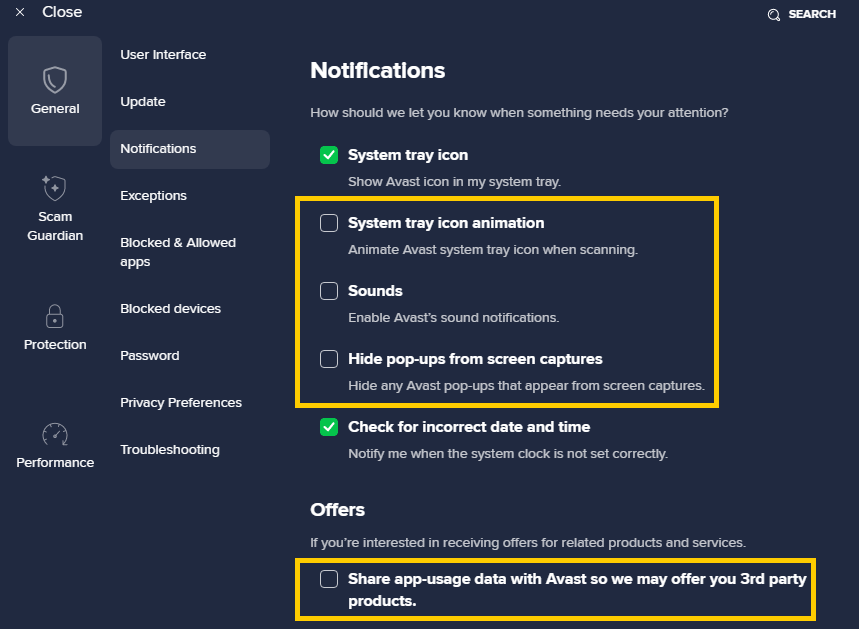
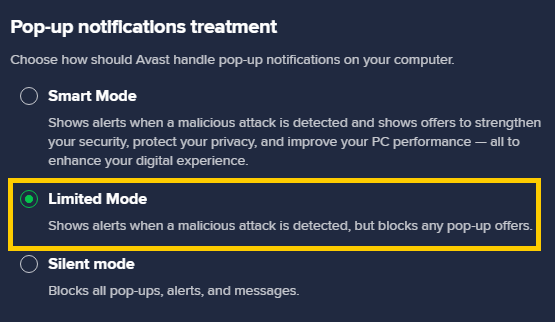
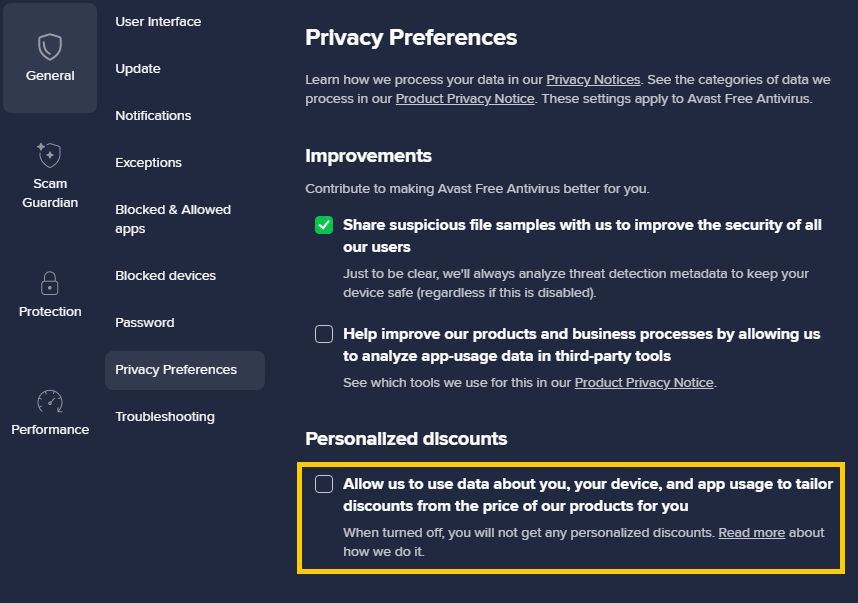
If you want your scanner to run smoothly with as few annoying sales messages for its premium products as possible (which almost no-one needs despite the urgency they sell them to you with), you’ll need to tweak settings. To do that in Avast:
Go to Menu > Settings > Notifications, then de-select these four settings:
And scroll a little further down to select this option:
Then click on Privacy Preferences and de-select this option:
5. Try to avoid logging into accounts when on the move
Really try to avoid logging into your lending accounts when using public WIFI, such as on a train, in a hotel or a coffee shop. (Although using your own mobile data should be okay.)
That is even if the WIFI has a password.
On Windows, I use the free Windscribe, but you can simply search the web for “safest VPN” to choose yours.
Further reading
What P2P Lending Providers Are Doing About Greater Cybersecurity Risks From AI.